当然技高一筹的多的去,我不保证这个百分之百防爬,一切以实物为准。
本站由Cloudflear与雷池WAF保护。
这是一个静态网站,比如我们放入一些转跳网站和资源网站,这个网站可能不想让脚本和代码审查直接抓去。当然还有二维码,甚至是收款码等。可以防止一些低端机器脚本扫描,也防止直接显示
如果你有比较好的资源链接,可以吧链接存在后端CLoudflear Workers里,只有认证成功的cookis才可以获取准确链接。安全系数是可以的,可以存放一些加密内容。
这里提供两种方法:一个是加密数据,一般为网盘直接下载链接和一些资源网站转跳,完全数据库不在前端,有很好的安全性。
第二种是:比如图片和一些二维码,我们在人机验证结束后才加载二维码图片,有效规避机器扫描封站的可能性。
下面以两种不同的架构来讲来实现不同的反爬和窃取的情况。
声明:遵纪守法请勿上传违法内容!出现问题与本站和本人无关!
1. 用户访问你的网页 (index.html)。
2. 用户查看网页源代码... 什么也看不到。只能看到一个会去请求 Worker 的脚本。
3. 用户通过 Turnstile 验证,前端拿到一个 token。
4. 前端拿着 token 和 fileId 去敲你 Worker(后端)的门。
5. Worker(后端) 作为后端,它在服务器上再次验证 token 的真伪。
6. 验证为真,Worker 才从自己的“保险库”(linkDatabase) 里取出密码,发回给前端。
• 安全性:极高 (High)
• 这是真正的安全。
• 无法绕过。 除非黑客能黑进你的 Cloudflare 账户,否则他们永远无法在不通过验证的情况下获取你的密码数据库。
• 为什么? 因为秘密数据(密码和链接)压根就不在用户浏览器加载的那个 index.html 文件里。当然你可以用它存一些敏感数据。
这是一个完整的、手把手的详细教程。我们将使用 Cloudflare Turnstile(用于人机验证)和 Cloudflare Workers(作为安全后端)以及 一个前端静态html来构建这个系统。
这套方案 90% 都在 Cloudflare 生态中,性能极高,而且在很大使用额度内是完全免费的。
• 第 1 步: 获取 Cloudflare Turnstile 密钥(站点密钥 和 秘密密钥)。
• 第 2 步: 创建后端 (Cloudflare Worker) 并配置密码库。
• 第 3 步: 创建前端 (Cloudflare Pages) 并部署跳转网页。
• 第 4 步: 连接并测试。
• 第 5 步: 如何添加和管理你的分享链接。
这是你的人机验证“锁”和“钥匙”。
1. 登录你的 Cloudflare 仪表板。
2. 在左侧菜单中,找到 Turnstile。
3. 点击 Add Site (添加站点)。
4. 填写表单:
• Site Name (站点名称): 填写一个你好记的名字,例如 我的跳转页。
• Domain (域名): 我们将使用 Cloudflare Pages,它会给你一个 .pages.dev 的域名。我们稍后创建了 Pages 再回来填,或者你现在可以先留空,Cloudflare 允许你稍后再配置。
• Widget Mode (小部件模式): 这是关键!这将始终显示一个复选框,强制用户点击。
5. 点击 Create (创建)。
6. 创建后,你将看到两个密钥。请把它们复制到一个安全的地方:
• Site Key (站点密钥):(例如 1x00000000000000000000AB) - 这个是公开的,将放在HTML中。
• Secret Key (秘密密钥):(例如 1x0000000000000000000000000000000AA) - !! 绝对保密 !! 这个将放在你的后端Worker中。
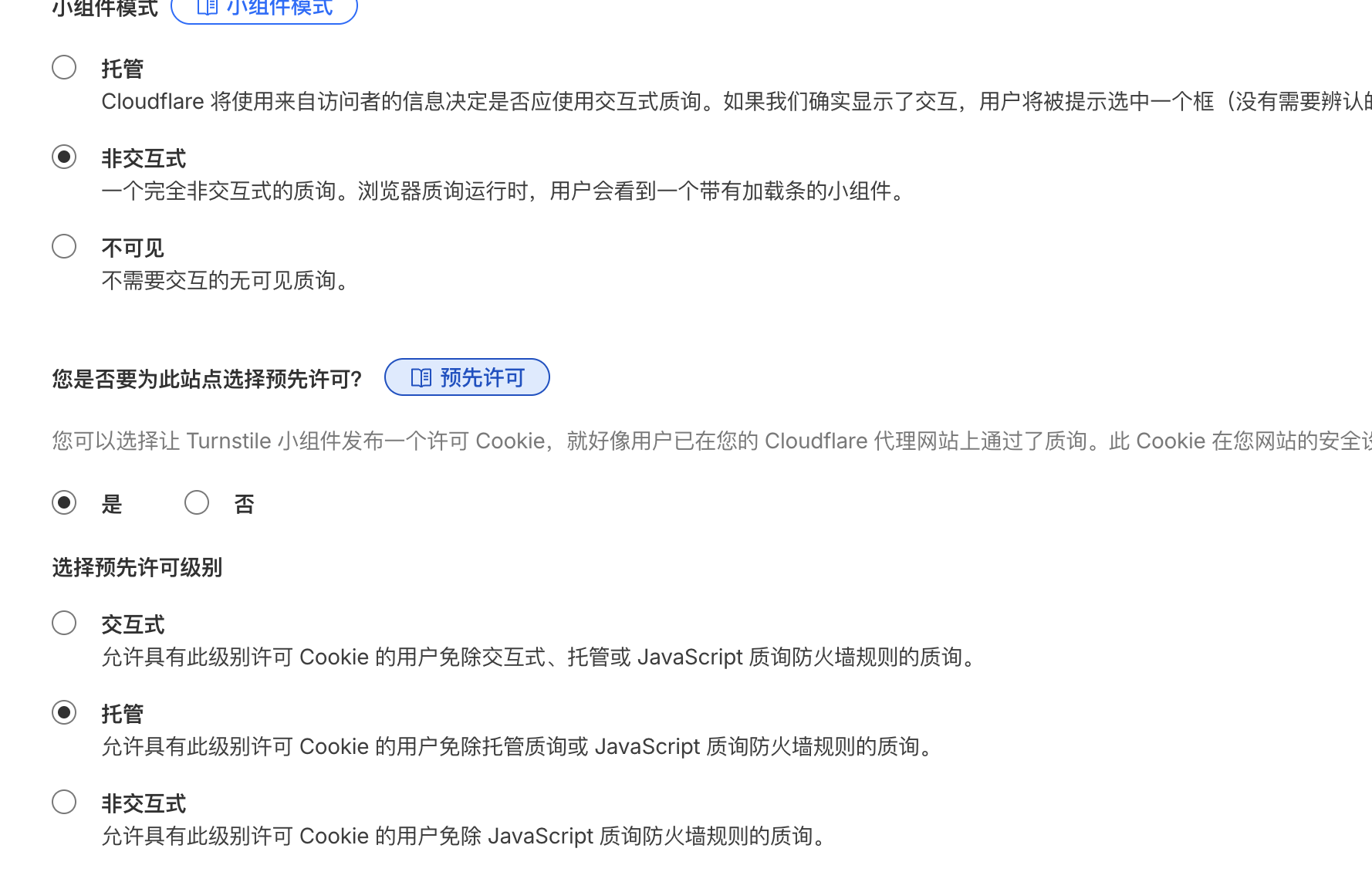
这是你的“密码保险库”,它负责在验证通过后才交出密码。
1. 在 Cloudflare 仪表板,转到 Workers & Pages。
2. 点击 Create Application (创建应用程序) > 选择 Create Worker (创建 Worker)。
3. 给你的 Worker 取一个名字(例如 link-vault 或 share-verifier)。
4. 点击 Deploy (部署)。
5. 部署成功后,点击 Edit code (编辑代码)。
6. 清空代码编辑器中所有的默认代码,然后粘贴以下所有代码:
/* ==============================================
   你的密码库
   在这里添加你所有的分享链接
   格式: "ID": { "password": "口令", "link": "链接地址" }
   ============================================== */
const linkDatabase = {
  "file1": {
    "password": "1234",
    "link": "https://pan.baidu.com/s/xxxxxxxx"
  },
  "report-2025": {
    "password": "abcd",
    "link": "https://weiyun.com/s/xxxxxxxx"
  },
  "game-mod": {
    "password": "xyz987",
    "link": "https://www.123pan.com/s/xxxxxxxx"
  }
};
/* ============================================== */

export default {
  async fetch(request, env) {
    // 设置CORS响应头,允许你的前端页面访问
    const corsHeaders = {
      'Access-Control-Allow-Origin': '*', // 安全提示:部署后,请将 '*' 替换为你的前端Pages域名
      'Access-Control-Allow-Methods': 'POST, OPTIONS',
      'Access-Control-Allow-Headers': 'Content-Type',
    };

    // 处理 OPTIONS 预检请求(浏览器在POST前会发送)
    if (request.method === 'OPTIONS') {
      return new Response(null, { headers: corsHeaders });
    }

    // 只接受 POST 请求
    if (request.method !== 'POST') {
      return new Response('只接受 POST', { status: 405 });
    }

    // --- 1. 解析来自前端的请求 ---
    let data;
    try {
      data = await request.json();
    } catch (e) {
      return new Response(JSON.stringify({ success: false, message: '无效的请求体' }), { status: 400, headers: corsHeaders });
    }

    const { token, fileId } = data;

    // 从环境变量中获取秘密密钥
    const TURNSTILE_SECRET_KEY = env.TURNSTILE_SECRET_KEY;

    if (!token || !fileId || !TURNSTILE_SECRET_KEY) {
      return new Response(JSON.stringify({ success: false, message: '请求缺少必要参数' }), { status: 400, headers: corsHeaders });
    }

    // --- 2. 验证 Turnstile 令牌 ---
    // 这是后端服务器之间的通信,用于验证用户是否真的通过了人机验证
    const verificationResponse = await fetch('https://challenges.cloudflare.com/turnstile/v0/siteverify', {
      method: 'POST',
      headers: { 'Content-Type': 'application/json' },
      body: JSON.stringify({
        secret: TURNSTILE_SECRET_KEY, // 你的秘密密钥
        response: token,               // 来自前端的令牌
      }),
    });

    const verificationResult = await verificationResponse.json();

    // --- 3. 处理验证结果 ---
    if (verificationResult.success) {
      // 验证成功!

      // --- 4. 查找并返回密码 ---
      const secretData = linkDatabase[fileId];

      if (secretData) {
        // 找到了!把秘密信息发回给前端
        return new Response(JSON.stringify({
          success: true,
          password: secretData.password,
          link: secretData.link
        }), { headers: corsHeaders });
      } else {
        // 验证成功了,但是文件ID不存在
        return new Response(JSON.stringify({ success: false, message: '文件ID不存在' }), { status: 404, headers: corsHeaders });
      }
    } else {
      // Turnstile 验证失败!
      return new Response(JSON.stringify({ success: false, message: '人机验证失败' }), { status: 403, headers: corsHeaders });
    }
  },
};
格式: "ID": { "password": "口令", "link": "链接地址" }每次添加数据库时候需要道这里添加,下载。更新和加入新的地址和文字。
这里需要加入环境变量
 // 从环境变量中获取秘密密钥
    const TURNSTILE_SECRET_KEY = env.TURNSTILE_SECRET_KEY;
你也可以在写代码时候自己加上,当然你也可以通过环境变量倒入。(不建议如果有人检查道代码会获取到密钥,这个和站长密钥不一样。有安全隐患)
添加变量和机密,点击密钥,输入TURNSTILE_SECRET_KEY,数值Secret Key (秘密密钥):
(例如 1x0000000000000000000000000000000AA) - !! 绝对保密 !! 这个将放在你的后端Worker中。
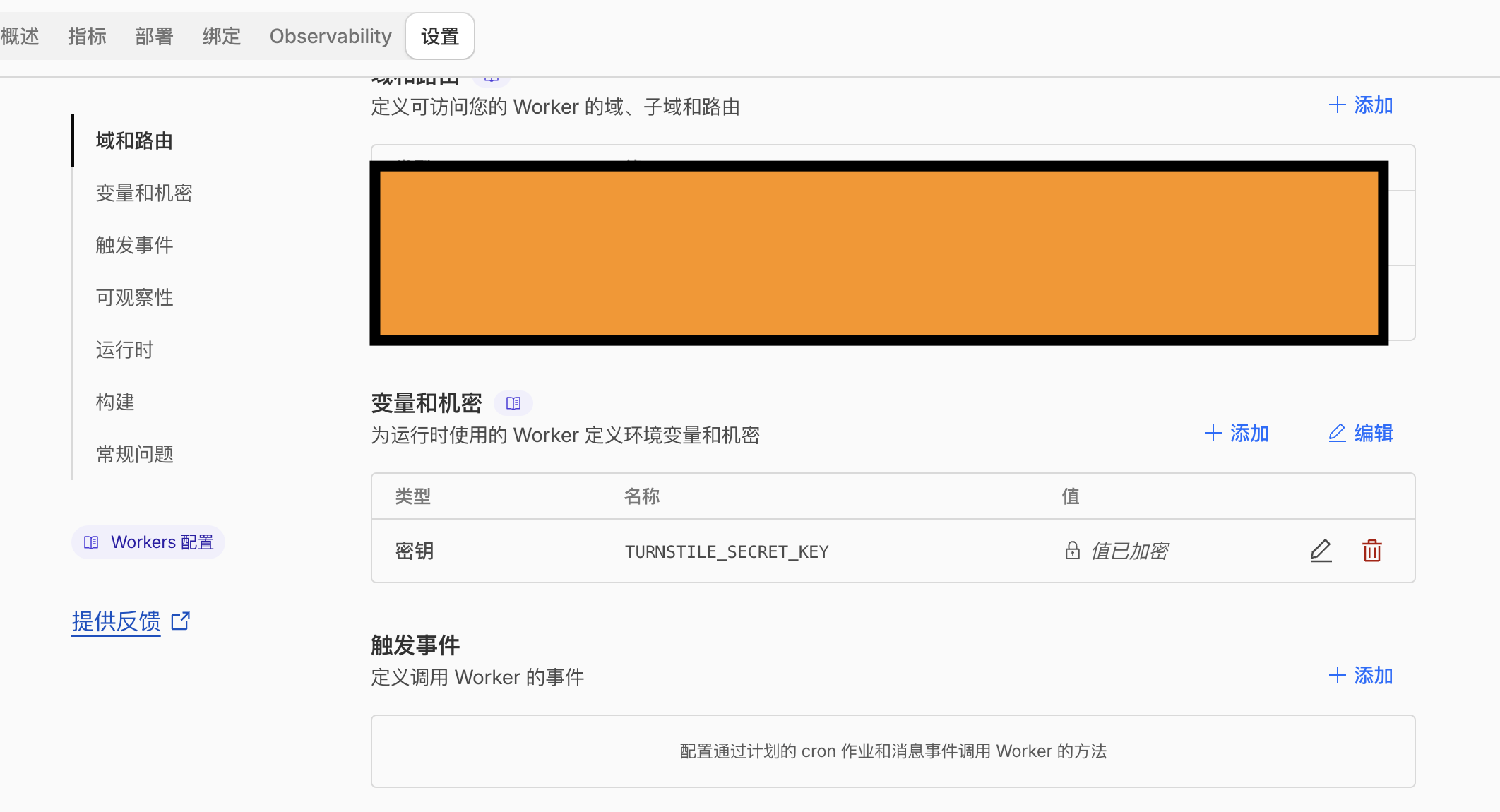
这时候你就搭建好了后端,其实你现在可以用dve分配的后缀访问后台,就是这个宽带口径比较小。你只能看到一个post,他只接受固定站点请求站点密钥确认的post请求。
ok 后端我们就搞好了
具有美观,黑白简介,昼夜切换。
前端动态加载,不具有敏感数据。
适配手机,平板,电脑不同比例和尺寸。
认证后有动画,具有比较好的仪式感。
<!DOCTYPE html>
<html lang="zh-CN">
<head>
    <meta charset="UTF-8">
    <meta name="viewport" content="width=device-width, initial-scale=1.0">
    <title>Willem 分享资源站 - 安全验证</title>
    <script src="https://challenges.cloudflare.com/turnstile/v0/api.js" async defer></script>
    <style>
        /* 全局变量和基本样式 */
        :root {
            --bg-color-light: #f8f8f8;
            --text-color-light: #333333;
            --accent-color-light: #007bff;
            --border-color-light: #e0e0e0;
            --card-bg-light: #ffffff;
            --shadow-light: rgba(0,0,0,0.08);

            --bg-color-dark: #222222;
            --text-color-dark: #f8f8f8;
            --accent-color-dark: #8ab4f8;
            --border-color-dark: #444444;
            --card-bg-dark: #333333;
            --shadow-dark: rgba(0,0,0,0.25);

            /* 默认使用浅色模式 */
            --bg-color: var(--bg-color-light);
            --text-color: var(--text-color-light);
            --accent-color: var(--accent-color-light);
            --border-color: var(--border-color-light);
            --card-bg: var(--card-bg-light);
            --shadow: var(--shadow-light);

            /* 【新】定义一个醒目的绿色 */
            --success-green: #28a745;
        }

        /* 深色模式样式切换 */
        body.dark-mode {
            --bg-color: var(--bg-color-dark);
            --text-color: var(--text-color-dark);
            --accent-color: var(--accent-color-dark);
            --border-color: var(--border-color-dark);
            --card-bg: var(--card-bg-dark);
            --shadow: var(--shadow-dark);
        }

        body {
            font-family: -apple-system, BlinkMacSystemFont, "Segoe UI", Roboto, "Helvetica Neue", Arial, sans-serif;
            margin: 0;
            padding: 0;
            display: flex;
            flex-direction: column;
            justify-content: center;
            align-items: center;
            min-height: 100vh;
            background-color: var(--bg-color);
            color: var(--text-color);
            transition: background-color 0.3s ease, color 0.3s ease;
            -webkit-font-smoothing: antialiased;
            -moz-osx-font-smoothing: grayscale;
        }

        header {
            margin-bottom: 2rem;
            text-align: center;
        }

        h1.site-title {
            font-size: clamp(2rem, 5vw, 3.5rem);
            font-weight: 700;
            color: var(--text-color);
            letter-spacing: 1px;
            text-shadow: 0 2px 4px var(--shadow);
            margin: 0;
            padding: 0.5rem 0;
        }

        .container {
            background: var(--card-bg);
            padding: clamp(1.5rem, 5vw, 3rem);
            border-radius: 12px;
            box-shadow: 0 6px 20px var(--shadow);
            text-align: center;
            width: 90%;
            max-width: 500px;
            border: 1px solid var(--border-color);
            transition: background 0.3s ease, box-shadow 0.3s ease, border-color 0.3s ease;
        }

        h3 {
            margin-top: 0;
            font-size: clamp(1.2rem, 4vw, 1.8rem);
            color: var(--text-color);
            margin-bottom: 1rem;
        }

        p {
            color: var(--text-color);
            line-height: 1.6;
            font-size: clamp(0.9rem, 2.5vw, 1.1rem);
            margin-bottom: 1.5rem;
        }

        .cf-turnstile {
            margin: 2rem auto;
            display: flex;
            justify-content: center;
            align-items: center;
        }

        #get-link-btn {
            display: none;
            margin-top: 1.5rem;
            width: 100%;
            padding: 0.8rem 1.5rem;
            font-size: clamp(0.9rem, 3vw, 1.1rem);
            font-weight: 600;
            background-color: var(--accent-color);
            color: white;
            border: none;
            border-radius: 8px;
            cursor: pointer;
            transition: background-color 0.2s ease, transform 0.1s ease;
            box-shadow: 0 4px 10px rgba(0,0,0,0.1);
        }

        #get-link-btn:disabled {
            background-color: #ccc;
            cursor: not-allowed;
            box-shadow: none;
        }

        #get-link-btn:hover:not(:disabled) {
            background-color: #0056b3;
            transform: translateY(-2px);
        }

        /* 【重大修改】认证成功后的结果框样式 */
        #result {
            margin-top: 1.8rem;
            font-weight: normal;
            font-size: clamp(0.95rem, 3vw, 1.15rem);
            word-wrap: break-word;
            padding: 1.5rem;
            border-radius: 8px;
            text-align: left;
            line-height: 1.8;

            /* 【新】强制使用白色背景,无论日夜 */
            background-color: #ffffff;

            /* 【新】强制使用深色文字,无论日夜 */
            color: #333333;

            /* 【新】添加你要求的阴影 */
            box-shadow: 0 5px 20px rgba(0, 0, 0, 0.12);

            /* 【新】使用更柔和的边框 */
            border: 1px solid #e0e0e0;
        }

        /* 【新】结果框内的“恭喜”标题样式 */
        .congrats-title {
            text-align: center;
            margin-bottom: 1rem;
            font-size: 1.2rem;
            font-weight: 600;
            color: #222222; /* 强制为黑色 */
        }

        /* 【新】结果框内的“提取口令”样式 */
        #result strong {
            color: #222222; /* 强制为黑色 */
            font-size: clamp(1.1rem, 3.5vw, 1.3rem);
            display: block;
            margin-bottom: 0.5rem;
            background-color: #f0f0f0; /* 给口令一个浅灰色背景,突出显示 */
            padding: 0.5rem;
            border-radius: 6px;
        }

        /* 【新】结果框内的“跳转链接”样式 */
        #result a {
            color: var(--success-green); /* 强制为绿色 */
            text-decoration: none;
            font-weight: 600; /* 加粗 */
        }
        #result a:hover {
            text-decoration: underline;
            color: #218838; /* 悬停时深绿色 */
        }

        /* 【新】结果框内的“温馨提示”样式 */
        .disclaimer {
            font-size: 0.9rem;
            color: #666666; /* 强制为中灰色文字 */
            text-align: center;
        }

        /* 【新】结果框内的分割线 */
        .result-hr {
            border: 0;
            border-top: 1px solid #e0e0e0;
            margin: 1.5rem 0;
        }

        /* --- 礼炮动画修改 --- */
        .confetti-container {
            position: fixed;
            top: 0;
            left: 0;
            width: 100%;
            height: 100%;
            pointer-events: none;
            overflow: hidden;
            z-index: 9999;
        }
        .confetti {
            position: absolute;
            width: 10px;
            height: 10px;
            opacity: 0;
            transform: translateY(0) rotateZ(0);
            animation: confetti-fall 3s ease-out forwards; /* 动画时间延长 */
        }

        /* 【新】增加矩形纸片,更像礼炮 */
        .confetti.rectangle {
            width: 8px;
            height: 15px;
            border-radius: 4px; /* 轻微圆角 */
        }

        @keyframes confetti-fall {
            0% {
                opacity: 1;
                transform: translateY(-10vh) translateX(0) rotateZ(0deg) scale(1.2); /* 从屏幕顶部中间开始 */
            }
            100% {
                opacity: 0;
                transform: translateY(100vh) translateX(calc(Math.random() * 100 - 50)vw) rotateZ(1080deg) scale(0.5); /* 掉落时旋转并左右飘散 */
            }
        }
    </style>
</head>
<body>
    <header>
        <h1 class="site-title">Willem 分享资源站</h1>
    </header>

    <div class="container">
        <h3>请先完成人机验证</h3>
        <p>为了获取分享链接,请点击下方的复选框完成验证,然后点击“获取链接”。</p>

        <div class="cf-turnstile"
             data-sitekey="YOUR_SITE_KEY_HERE"
             data-callback="onTurnstileSuccess">
        </div>

        <button id="get-link-btn">获取链接</button>

        <div id="result"></div>
    </div>

    <script>
        let turnstileToken = null;
        const button = document.getElementById('get-link-btn');
        const resultDiv = document.getElementById('result');
        const siteTitle = document.querySelector('.site-title');

        // --- 1. 日夜模式切换逻辑 (不变) ---
        function setPreferredTheme() {
            const now = new Date();
            const hour = now.getHours();
            const isNight = (hour >= 19 || hour < 7);
            if (isNight) {
                document.body.classList.add('dark-mode');
            } else {
                document.body.classList.remove('dark-mode');
            }
        }
        setPreferredTheme();

        // (A) Turnstile 验证成功 (不变)
        function onTurnstileSuccess(token) {
            console.log("Turnstile 验证成功!");
            turnstileToken = token;
            button.style.display = 'block';
            button.disabled = false;
        }

        // (B) 点击按钮 (不变)
        button.addEventListener('click', async () => {

            button.disabled = true;
            resultDiv.innerHTML = '正在验证,请稍候...';

            const params = new URLSearchParams(window.location.search);
            const fileId = params.get('id');

            if (!fileId) {
                resultDiv.innerHTML = '错误:未指定文件ID。请检查你的链接是否完整。<br><small style="color: #666;">(例如:https://your-domain.com?id=your-file-id)</small>';
                button.disabled = false;
                return;
            }

            // (D) 发送请求 (不变)
            try {
                const response = await fetch('YOUR_WORKER_URL_HERE', { // **再次检查替换为你的 Worker URL**
                    method: 'POST',
                    headers: { 'Content-Type': 'application/json' },
                    body: JSON.stringify({ token: turnstileToken, fileId: fileId }),
                });

                const data = await response.json();

                // (E) 处理结果 【重大修改】
                if (data.success) {

                    // 【新】使用新的 HTML 结构和 class
                    resultDiv.innerHTML = `
                        <p class="congrats-title">
                            恭喜!验证成功!🎉
                        </p>
                        <p>提取口令:<strong>${data.password}</strong></p>
                        <p>分享链接:<a href="${data.link}" target="_blank" rel="noopener noreferrer">点击跳转到资源页面</a></p>
                        <hr class="result-hr">
                        <p class="disclaimer">
                            温馨提示:本站资源来之不易,请勿用于非法用途,<br>并请勿恶意下载或不加控制地分享。感谢您的理解与支持!
                        </p>
                    `;
                    button.style.display = 'none';

                    // 【新】调用改进版的礼炮动画
                    playImprovedConfetti();
                } else {
                    resultDiv.innerHTML = `验证失败:${data.message}<br><small style="color: #666;">请尝试重新验证。</small>`;
                    button.disabled = false;
                }
            } catch (error) {
                console.error("Fetch error:", error);
                resultDiv.innerHTML = '请求失败,请检查网络或联系管理员。<br><small style="color: #666;">(服务器可能暂时无法访问)</small>';
                button.disabled = false;
            }
        });

        // --- 2. 礼炮动画逻辑 【重大修改】 ---
        function playImprovedConfetti() {
            const container = document.createElement('div');
            container.classList.add('confetti-container');
            document.body.appendChild(container);

            const particleCount = 100; // 增加到 100 个

            // 【新】使用更喜庆、更明亮的颜色
            const colors = [
                '#FFD700', // 金色
                '#FF4500', // 橙红
                '#28a745', // 绿色 (和你链接颜色一致)
                '#007bff', // 蓝色 (和 accent color 一致)
                '#E91E63'  // 粉色
            ];

            for (let i = 0; i < particleCount; i++) {
                const confetti = document.createElement('div');
                confetti.classList.add('confetti');

                // 随机使用圆形或矩形
                if (Math.random() > 0.5) {
                    confetti.classList.add('rectangle');
                }

                // 从屏幕顶部中心区域爆炸
                confetti.style.left = Math.random() * 50 + 25 + 'vw'; // 在 25% 到 75% 宽度之间
                confetti.style.top = Math.random() * 20 - 10 + 'vh'; // 在屏幕顶部附近

                confetti.style.backgroundColor = colors[Math.floor(Math.random() * colors.length)];

                // 随机化动画
                const randomDelay = Math.random() * 0.5 + 's'; // 0 - 0.5s 延迟
                const randomDuration = Math.random() * 2 + 2.5 + 's'; // 2.5s - 4.5s 持续

                confetti.style.animationDelay = randomDelay;
                confetti.style.animationDuration = randomDuration;

                // 飘散效果
                const randomXEnd = (Math.random() - 0.5) * 60 + 'vw'; // 最终 X 轴飘散

                // 动态设置 CSS 变量来控制 keyframe 里的随机性
                confetti.style.setProperty('--x-end', randomXEnd);

                container.appendChild(confetti);
            }

            // 【新】修改 keyframes 来使用 CSS 变量
            // 我们不能在 JS 中修改 @keyframes,所以我们把随机性加到 transform 上
            const keyframesStyle = document.createElement('style');
            keyframesStyle.innerHTML = `
                @keyframes confetti-fall {
                    0% {
                        opacity: 1;
                        transform: translateY(-10vh) rotateZ(0deg) scale(1);
                    }
                    100% {
                        opacity: 0;
                        transform: translateY(100vh) translateX(var(--x-end, 0)) rotateZ(1080deg) scale(0.3);
                    }
                }
            `;
            document.head.appendChild(keyframesStyle);

            // 动画结束后移除容器
            setTimeout(() => {
                container.remove();
                keyframesStyle.remove(); // 移除动态添加的样式
            }, 5000); // 5秒后移除 (确保所有动画都已结束)
        }
    </script>
</body>
</html>
            // (D) 发送请求 (不变)
            try {
                const response = await fetch('YOUR_WORKER_URL_HERE', { // **再次检查替换为你的 Worker URL**
                    method: 'POST',
                    headers: { 'Content-Type': 'application/json' },
                    body: JSON.stringify({ token: turnstileToken, fileId: fileId }),
                });
这段代码里面的YOUR_WORKER_URL_HERE,替换成你Cloudflear的构建的Wocker,记得带上https://
        <h3>请先完成人机验证</h3>
        <p>为了获取分享链接,请点击下方的复选框完成验证,然后点击“获取链接”。</p>

        <div class="cf-turnstile"
             data-sitekey="YOUR_SITE_KEY_HERE"
             data-callback="onTurnstileSuccess">
        </div>
这里的YOUR_SITE_KEY_HERE。换成你在最上面注册得到的站长密钥。
• Site Key (站点密钥):(例如 1x00000000000000000000AB) - 这个是公开的,将放在HTML中。
ok前端就到这里。
这是一个html网页,把它放在一些可以搭建静态网页的地方就可以了,比如宝塔......等
我这里放在了宝塔,选择正确的运行目录,新建index.html
复制粘贴就可以,很简单就不分段了。
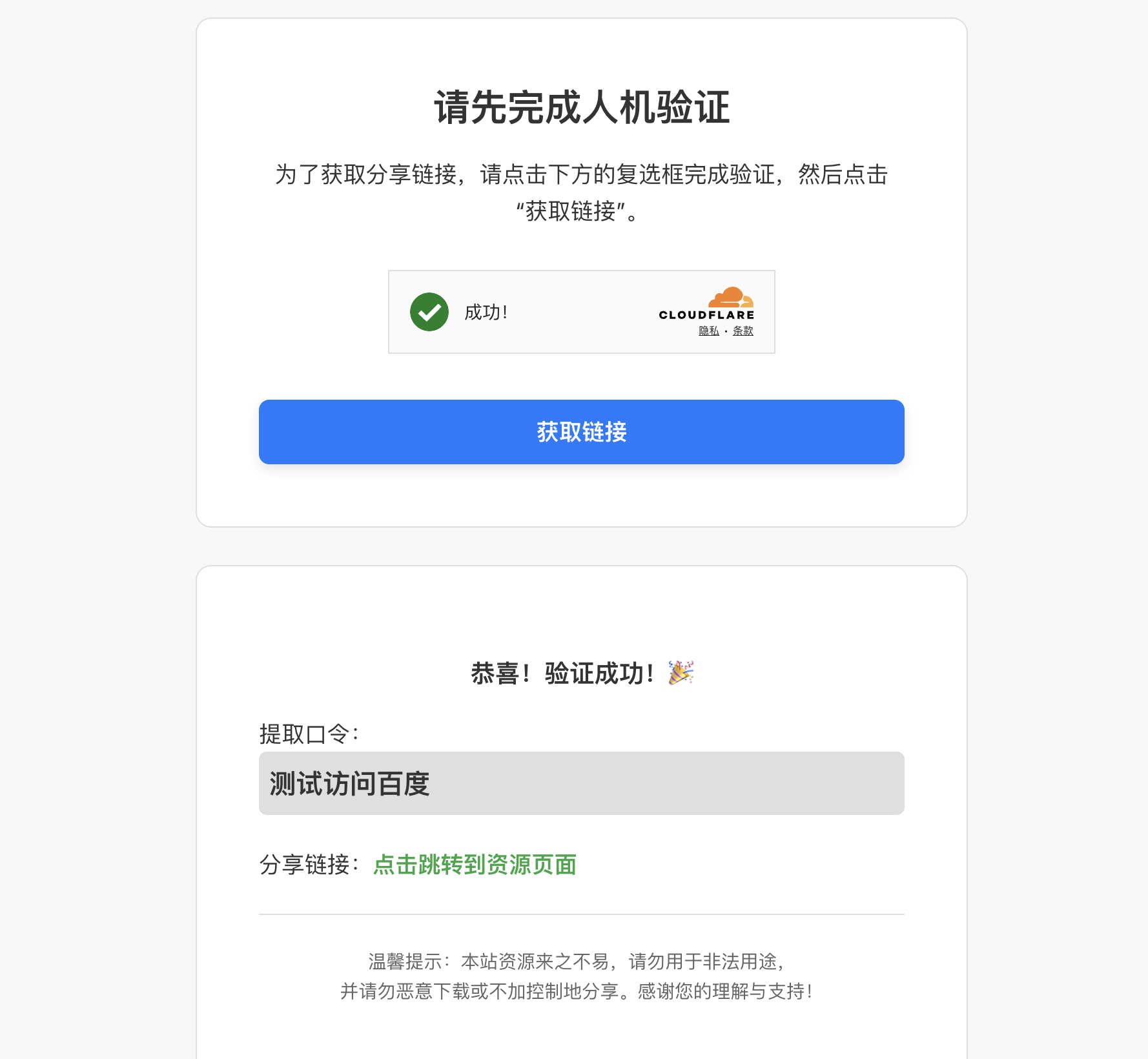
运行一下就大概是这样的结果。
/* ==============================================
   你的密码库
   在这里添加你所有的分享链接
   格式: "ID": { "password": "口令", "link": "链接地址" }
   ============================================== */
const linkDatabase = {
  "file1": {
    "password": "1234",
    "link": "https://pan.baidu.com/s/xxxxxxxx"
  },
  "report-2025": {
    "password": "abcd",
    "link": "https://weiyun.com/s/xxxxxxxx"
  },
  "game-mod": {
    "password": "xyz987",
    "link": "https://www.123pan.com/s/xxxxxxxx"
  }
};
/* ============================================== */
在创建cloudflear worker时候我们在这里写如果一些卡密。
link是链接:对应认证后的,点击转跳资源页面。
paassword:对应测试访问百度。
“”号中间是你的ID名称,来判断你请求的路径是否存在与简单数据库的判断
比如我们请求第一个数据
  "file1": {
    "password": "1234",
    "link": "https://pan.baidu.com/s/xxxxxxxx"
  },
https://your.name.com/?id=file1
对应我们就会通过认证后加载,
    "password": "1234",
    "link": "https://pan.baidu.com/s/xxxxxxxx"
的信息内容。OK本次教程结束。
有问题可以留言,代码开源,可以自行更改前端。
有问题小伙伴可以留言,现自己解决问题哦!
加纳!!!!!!
